Code
pak::pkg_install("tidyplots")我注意到 Jan Broder Engler 开发了一个名为 “tidyplots” 的新 R 包。这个包可以用简单的命令生成可直接发表的图,在很大程度上简化了 R 的绘图流程。
I noticed a new R package called “tidyplots” produced by Jan Broder Engler. This package could generate publication ready plots with simple commands, which largely simplified the R plotting process.
手册:https://jbengler.github.io/tidyplots/
The manual: https://jbengler.github.io/tidyplots/
我试用了一下,效果非常好。希望以后会有更多实用的函数。
I had a try and it works very well. I hope there will be more useful functions.
它基于 ggplot2 体系,因此也很容易按我们的需要添加更多特性。
It is based on ggplot2 system, it is also very easy to add more features as we want.
pak::pkg_install("tidyplots")开发版本可以通过以下方式安装
The development version could be installed with
pak::pkg_install("jbengler/tidyplots")library(tidyplots)| treatment | group | dose | participant | age | sex | score |
|---|---|---|---|---|---|---|
| A | placebo | high | p01 | 23 | female | 2 |
| A | placebo | high | p02 | 45 | male | 4 |
| A | placebo | high | p03 | 32 | female | 5 |
| A | placebo | high | p04 | 37 | male | 4 |
| A | placebo | high | p05 | 24 | female | 6 |
| B | placebo | low | p06 | 23 | female | 9 |
blog_tidyplots_theme(
  study |>
    tidyplot(x = treatment, y = score, color = treatment) |>
    add_data_points() |>
    add_mean_bar(alpha = 0.4) |>
    add_sem_errorbar() |>
    adjust_colors(new_colors = colors_discrete_seaside)
)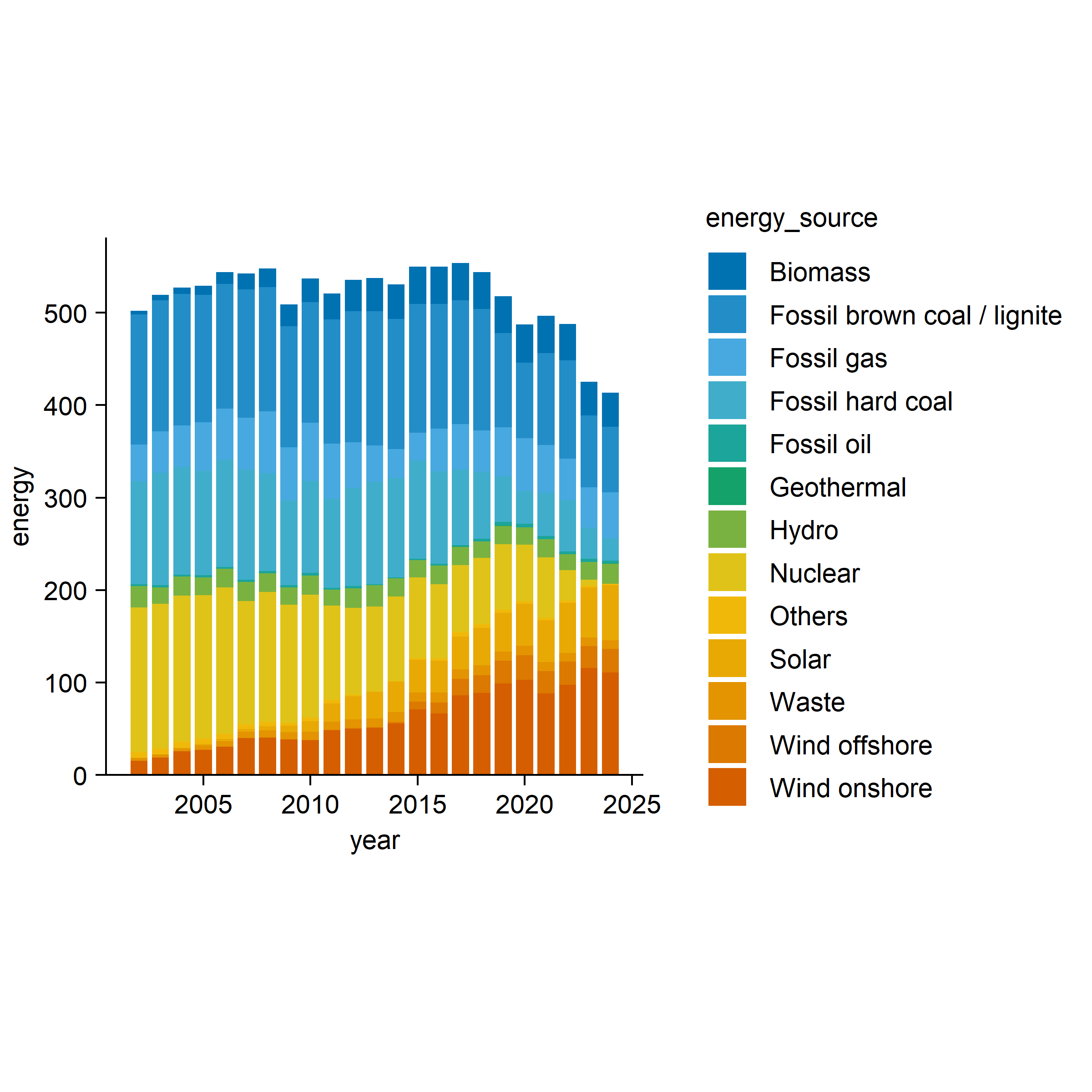
blog_tidyplots_theme(
  energy |>
    tidyplot(x = year, y = energy, color = energy_source) |>
    add_barstack_absolute()
)
它提供了许多实用的绘图函数类型,最好还是到它的官方网站了解如何使用这个包。
It provided many useful types of plotting function, it is better to go to its official website to learn how to use this package.
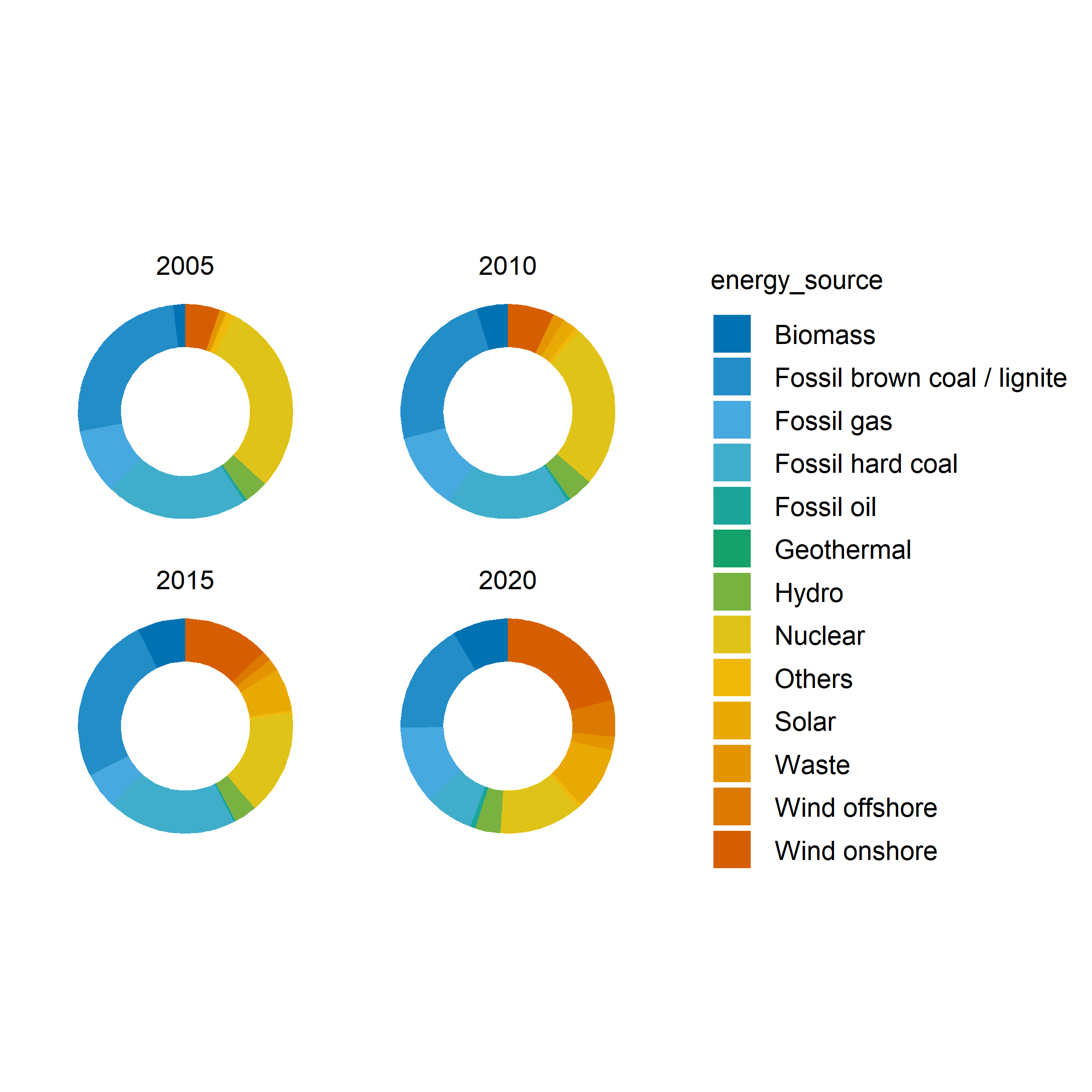
energy |>
  dplyr::filter(year %in% c(2005, 2010, 2015, 2020)) |>
  tidyplot(y = energy, color = energy_source) |>
  add_donut() |>
  adjust_size(width = 25, height = 25) |>
  adjust_theme_details(
    panel.background = element_rect(fill = "transparent", color = NA),
    plot.background = element_rect(fill = "transparent", color = NA),
    legend.background = element_rect(fill = "transparent", color = NA),
    legend.key = element_rect(fill = "transparent", color = NA),
    strip.background = element_rect(fill = "transparent", color = NA),
    panel.grid = element_blank(),
    panel.border = element_rect(color = "black", fill = NA, linewidth = 0.3),
    axis.ticks = element_line(colour = "black", linewidth = 0.3)
  ) |>
  split_plot(by = year)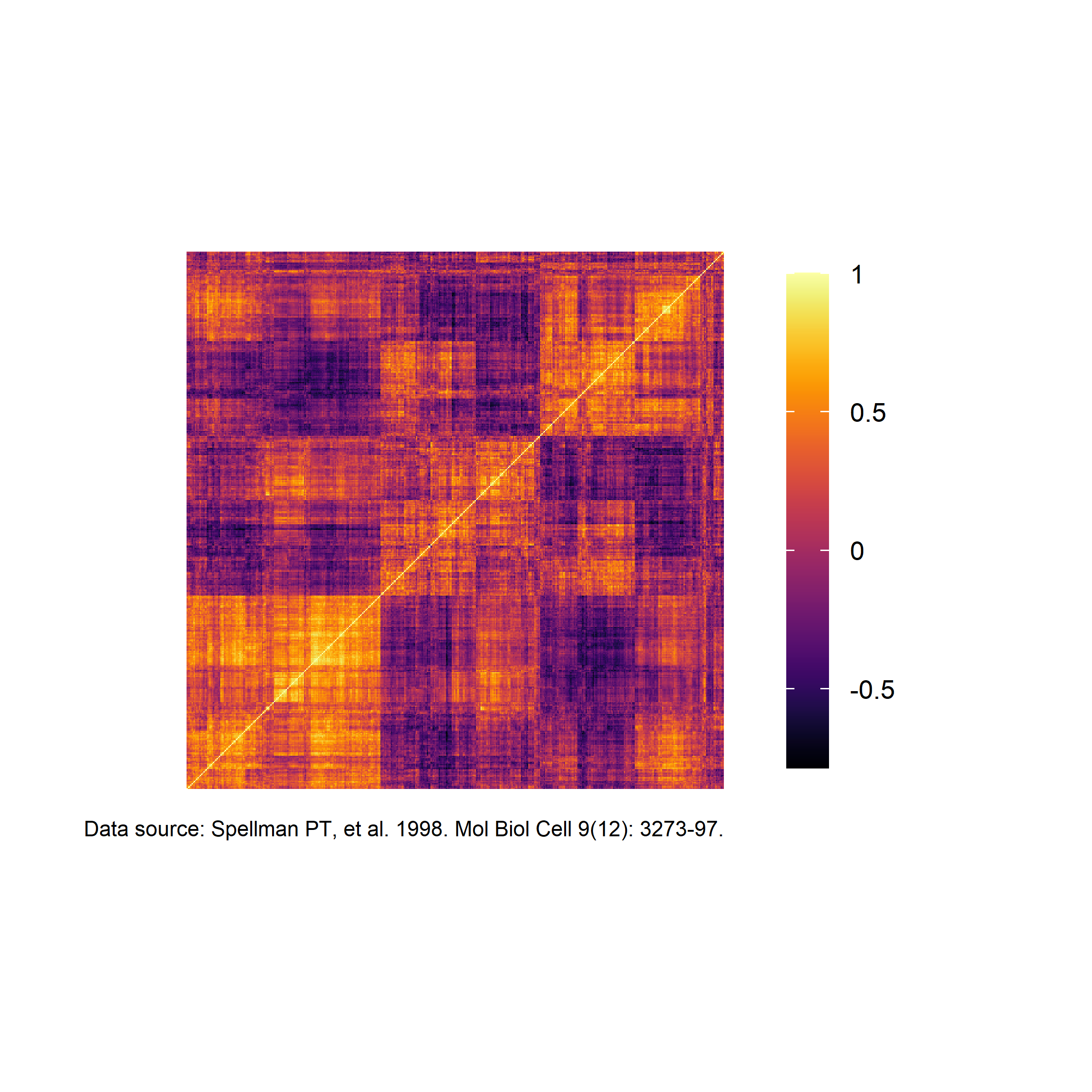
library(tidyverse)
#library(tidyplots)

df <-
  read_csv("https://tidyplots.org/data/correlation-matrix.csv")

blog_tidyplots_theme(
  df |>
    tidyplot(x = x, y = y, color = correlation) |>
    add_heatmap() |>
    sort_x_axis_labels(order_x) |>
    sort_y_axis_labels(order_y) |>
    remove_x_axis() |>
    remove_y_axis() |>
    remove_legend_title() |>
    adjust_legend_position("right") |>
    adjust_colors(colors_continuous_inferno) |>
    adjust_theme_details(legend.key.height = unit(1, "null")) |>
    add_caption("Data source: Spellman PT, et al. 1998. Mol Biol Cell 9(12): 3273-97.")
)
如果 tidyplots 能直接读取 .mcool 或 .hic 文件,那将会非常有帮助。
If tidyplots could directly read .mcool or .hic files, it will be very helpful.
我猜测这正是作者计划要做的事情;我们也可以用其他 R 包把 contact matrix 文件读入 data frame 试一试,但这需要付出更多努力。
I guess it is what he plans to do, we can use other R packages to read the contact matrix files into a dataframe to have a try, but it will take more efforts.